



The Playbook for RØDE (GRIN): Creator-to-Creator Affiliate Stores that Lift CVR and AOV
RØDE already has what most brands fight for: creators trust the products, creators show them on camera, and the audience watching those videos has a real reason to buy. The weak point is what happens after the click. A standard affiliate link can only send people to a general collection or a single product page, and shoppers still have to figure out: Which model is right for my use case? What do I need with it? Will it work with my camera/phone/PC? What do I buy first?
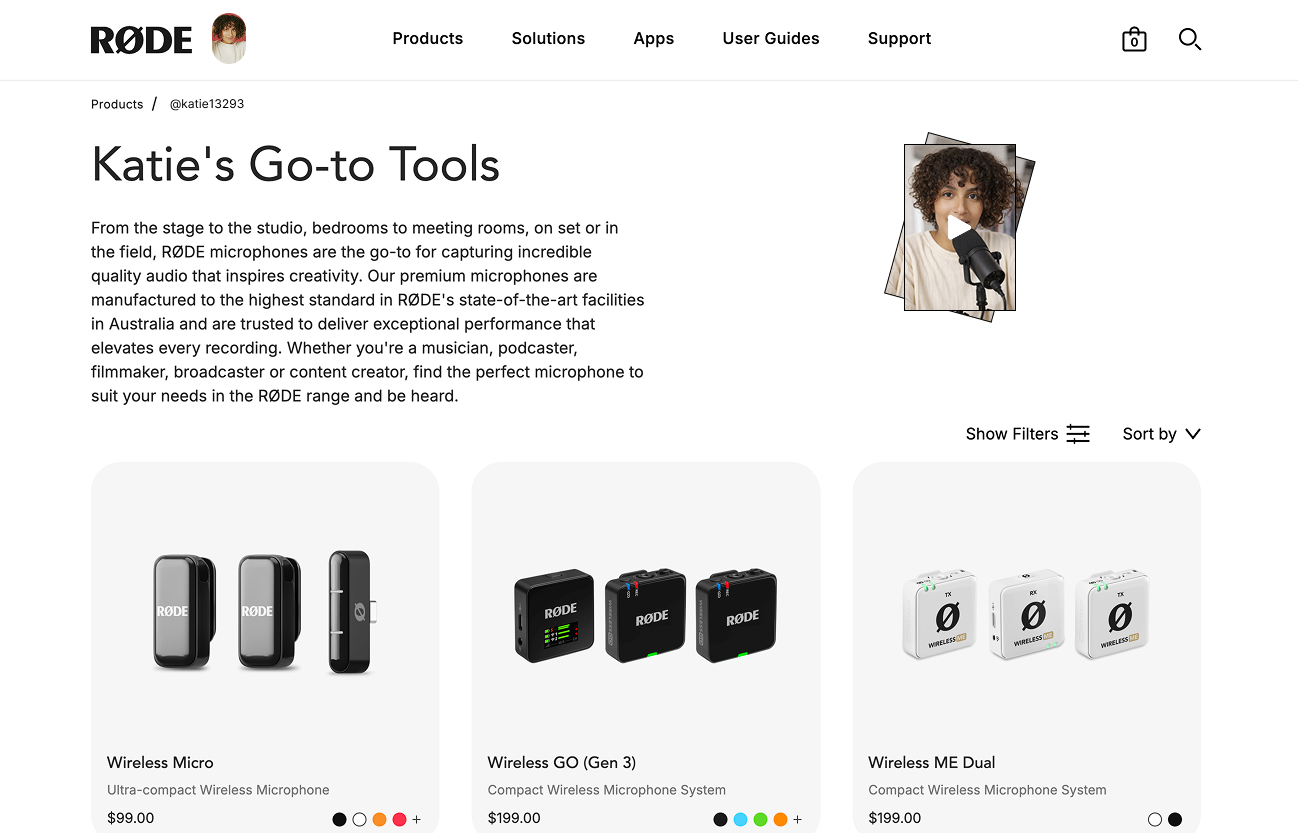
That uncertainty is where conversion rate drops and where average order value gets stuck at one item. CreatorCommerce solves that by turning each GRIN partner into a co-branded shopping experience on rode.com that looks and feels like a creator’s recommended kit, but functions like a high-performing funnel. The result is typically 30%+ higher conversion rate and 67% higher AOV compared to regular affiliate links, because the page does the choosing, the bundling, and the discounting for the shopper.
Step 0: Segment Strategy (who to win, and what each segment should sell)
Start by segmenting partners by audience intent and the type of audio problem they solve. RØDE’s catalog is deep (about 500 products), so the program wins when each partner sells a narrow set of setups rather than a broad catalog. The goal is not to create 500-product storefronts; it is to create 5–20 product funnels that feel obvious to the buyer.
Segment A: YouTube creators (tech, vlogging, education). These partners drive high volume and need fast 'which one do I buy' decisions. Their storefronts should focus on camera mics, wireless, and starter creator kits: one clear 'best for X' choice plus an upgrade path. Segment B: Podcasters and podcast networks. These partners can sell higher AOV by bundling: mic + arm + interface (if applicable) + cables + accessories, plus multi-mic setups for co-hosts. Segment C: Filmmakers / run-and-gun production. These partners need reliability and compatibility notes, and they respond well to 'my field kit' merchandising. Segment D: Musicians / home studio. This segment is naturally bundle-friendly (mic + stand + pop filter + shock mount or studio accessories). Segment E: Audio educators and reviewers. These partners can drive trust and comparison content; their storefronts should include crisp Q&A cards and 'why this vs that' logic.
For each segment, define a default offer style: a creator kit, a 'choose your setup' quiz, a curated comparison grid, or a seasonal bundle. This becomes the template you can replicate across dozens or hundreds of partners.
Step 1: Partner Enrollment (increase the number of quality partners joining)
Enrollment should be treated as an always-on funnel, not a one-time outreach push. First, tighten the application and onboarding to capture the minimum data needed to build a credible storefront immediately: primary channel, audience type, top content themes (podcasting, vlogging, filmmaking, streaming), typical buyer (beginner vs pro), and top 3 products they already use or recommend. Do not ask for long forms; use a short form plus optional add-ons.
Next, run three parallel enrollment lanes. Lane 1: Product seeding for fast-growing product lines and partners with credible use cases. The goal is not mass gifting; it is a small set of high signal creators who can build a 'my kit' funnel. Lane 2: Inbound recruitment by turning high-intent site visitors and existing customers into affiliates (e.g., post-purchase invite: 'Share your setup, earn on referrals'). Lane 3: Outbound email/DM to creators already ranking in your category: podcasters who publish weekly, YouTubers who do gear reviews, filmmaking educators, and niche streamers.
CreatorCommerce’s partner apps could power the onboarding flow so every accepted partner automatically gets a first version of their shop, even if you only have partial information. The key is speed: partners should see a real storefront on rode.com within 24–48 hours of approval.
Step 2: Partner Activation by Segment (make the first 7 days count)
Activation is where most affiliate programs lose money: partners join, get a link, and never build a story. RØDE can win by making the activation deliverable a co-branded storefront that looks finished, plus a simple content plan that matches the segment.
Shock-and-awe offer: each partner gets a storefront with their name, photo, recommended kits, and an auto-applied discount (no coupon math). Include a 'why I use this' section with short bullets, not long copy. For partners who have used RØDE in videos, pull a thumbnail, a quote, and one short clip request (10–20 seconds). If the partner has a history of purchases or known products, use automation + AI to draft product picks and compatibility notes, then let your team quickly approve and correct. This keeps quality high without making the program slow.
Activation by segment: YouTubers get a 'My creator audio kit' page and a pinned comment script. Podcasters get a 'Start here' kit plus an 'Upgrade your studio' kit and an ad-read script that references the storefront. Filmmakers get a field kit plus 'What I pack' content blocks. Musicians get a 'Vocal chain starter kit' with add-ons. Reviewers get comparison cards and a place to publish their 'testing notes'.
Paid amplification (whitelisted ads): for a small subset of top partners, run whitelisted Meta ads where the partner authorizes the ad account once, and you promote their co-branded storefront as the destination. This works best when the ad creative is partner-led (their face, their setup), while the shopping experience remains on rode.com. Start with retargeting and lookalikes built from engaged video viewers and site visitors.
Step 3: Co-branded Storefronts & Funnels (what each page should look like)
Each storefront should be a decision engine, not a mini homepage. The goal is to reduce choice and increase confidence. A high-performing RØDE creator storefront could include: (1) a hero section that states the use case ('Podcast kit I use every week'), (2) 2–4 primary kits with clear labels (Beginner / Best value / Pro), (3) short proof content (sound test, a clip, or a quote), (4) compatibility notes, and (5) add-ons that increase AOV without feeling pushy (mounts, windscreens, cables, cases, accessories).
Because you have a large catalog, use rules to keep the assortment tight. For example, each kit can have a hard cap on items (3–6) and a clear reason for each. The storefront should also support 'swap' logic ('If you record on iPhone, pick this variant') so the partner can cover multiple audience device types without adding clutter.
Funnel tests to run: A/B test a 'choose your setup' quiz vs a static kit grid. Test sound-test content above vs below the kits. Test a comparison block that answers 'Wireless GO vs VideoMic' style questions. Test a bundle-first add-to-cart vs individual add-to-cart. These are simple tests that can materially move CVR and AOV.
Step 4: Funnel Details (beyond the landing page: PDP, cart, pop-ups)
Most brands stop at a landing page, but the highest leverage is in the shopping flow itself. First, carry co-branding into product pages when the session originates from a partner link: show a small banner like 'Recommended by [Creator]' with their image and a link back to their shop. This reduces second thoughts and keeps the creator’s authority present during technical evaluation.
Next, use co-branded pop-ups sparingly for audio-specific friction. Examples: a compatibility checker ('What are you recording with? Camera / Phone / Computer / Console') that routes to the right kit; or a 'Need help choosing?' modal that surfaces the partner’s top two picks. For carts, make the discount automatic and visible as a line item so the customer trusts it. Use cart-based attribution so if a shopper browses multiple pages, you still credit the right partner and often capture ~2.5% more orders that would otherwise get lost.
Finally, use 'complete the setup' upsells that are actually useful: wind protection for outdoor creators, boom arms for podcasters, cases for travel, and accessory bundles for common use cases. Keep these suggestions inside the partner context (e.g., 'What I also use with this mic').
Step 5: Launch & Track (how to go live without breaking the current program)
Launch should be incremental. First, integrate Shopify + GRIN so existing partner links can resolve into CreatorCommerce storefronts without partners changing behavior. Start with a pilot cohort (e.g., 25–50 creators across segments) and build one storefront template per segment. Then scale by cloning the template and swapping product picks and content per partner.
Tracking should focus on: conversion rate (session to purchase), AOV, attach rate (how many items per order), and partner retention (partners who drive sales month over month). Add funnel-level metrics: kit click-through rate, quiz completion, add-to-cart rate, and checkout initiation. Within GRIN, compare performance of partners who have a co-branded shop vs those using standard links, and then prioritize rollout to the segments with the largest lift.
Step 6: Optimize (campaigns, content, and retention loops)
Optimization is where the moat forms. Run monthly content campaigns that give partners a reason to refresh their storefronts and talk about RØDE again. The easiest structure is 'moment + kit': a reason to buy plus a curated setup. Examples: 'New year podcast reset' (podcast kits), 'Travel season creator kit' (wireless + compact mics), 'Back-to-school student creator setup' (value kits), 'Outdoor filming season' (wind protection + field kits), and 'Holiday gifting for creators' (giftable bundles by price).
Retention must-haves: co-branded cart abandonment and post-purchase flows. If someone abandons checkout from a creator shop, send an email that references the creator, restates the kit, and keeps the discount intact. Post-purchase, send a setup email ('How to get the best sound') that includes a short creator tip and links to compatible add-ons. This increases repeat purchases and reduces returns because buyers feel guided.
Also run quarterly 'storefront refresh' prompts: ask partners for one new clip, one updated photo, and one new recommendation. If they do not respond, use automation to refresh with recent content or top-performing kits, then ask them to approve. The goal is to keep storefronts from going stale without creating operational load.
Step 7: Advanced (professional and publisher partners)
For higher-leverage partners like podcast networks, production communities, and creator education brands, consider deeper integrations than a single storefront. You could offer a fully co-branded, whitelabeled mini-site on rode.com with multiple landing pages: 'starter kits', 'studio upgrades', 'live streaming', and 'travel kits'. This turns the partner into a true channel with a portfolio of pages, not one link.
For publishers and educators with existing sites, offer product embeds or co-branded collections they can drop into their own pages, while still routing checkout through Shopify on RØDE’s domain. That keeps brand control and tracking consistent, while giving partners flexibility to monetize the content they already rank for. For B2B-like partners (studios, schools, production houses), create curated procurement pages with multi-unit options and a 'request a quote' form where appropriate, so the storefront serves both consumer and organizational buyers.
What RØDE could pilot first (a practical 30-day plan)
Week 1: define 4 segment templates (YouTube creator, podcaster, filmmaker, musician), pick 25–50 GRIN partners, and draft storefronts using partial data plus a short form. Week 2: publish storefronts, give each partner one launch script and two short content requests (sound test + setup photo), and turn on auto-discounting. Week 3: run the first funnel tests (kit grid vs quiz; bundle-first vs single item) and launch co-branded cart abandonment. Week 4: identify the top 20% stores by CVR and AOV lift, expand the pilot to the next cohort, and start whitelisted retargeting ads for the top creators.
That pilot keeps the scope controlled, proves the lift against standard affiliate links, and builds a repeatable system for scaling creator-to-creator referrals across a large catalog—while staying fully connected to GRIN and running natively on Shopify.


%201.png)
%201.png)