

This gap has always been the bottleneck.
And that's exactly what we've eliminated.
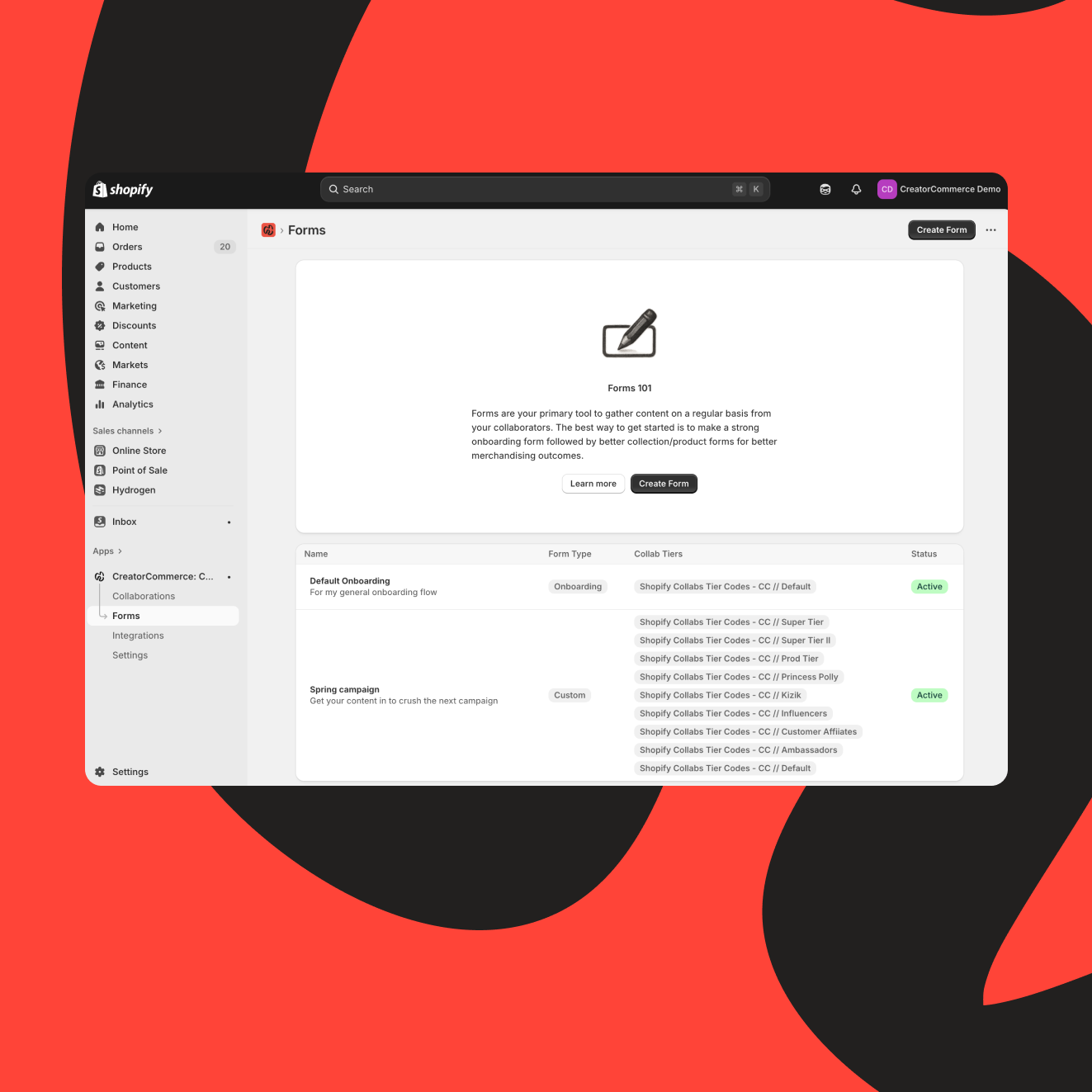
With the new CreatorCommerce Embedded Dashboard, building truly customized, collaboration-ready forms takes minutes: no ops person, no spreadsheet circus, no engineering ticket. It's clean, intuitive, and built for how modern brands actually collaborate.
Why forms matter more than anyone realizes
Recruitment is just the start. The magic happens after approval, when creators shape the content, products, and onsite experience that ultimately drive conversions. That requires data. Structured data. Creative data. Merchandising data. Funnel-shaping data.
So we built the simplest, fastest way to collect it.
CreatorCommerce now supports four purpose-built form types, each tailored to a phase of the collaboration lifecycle:
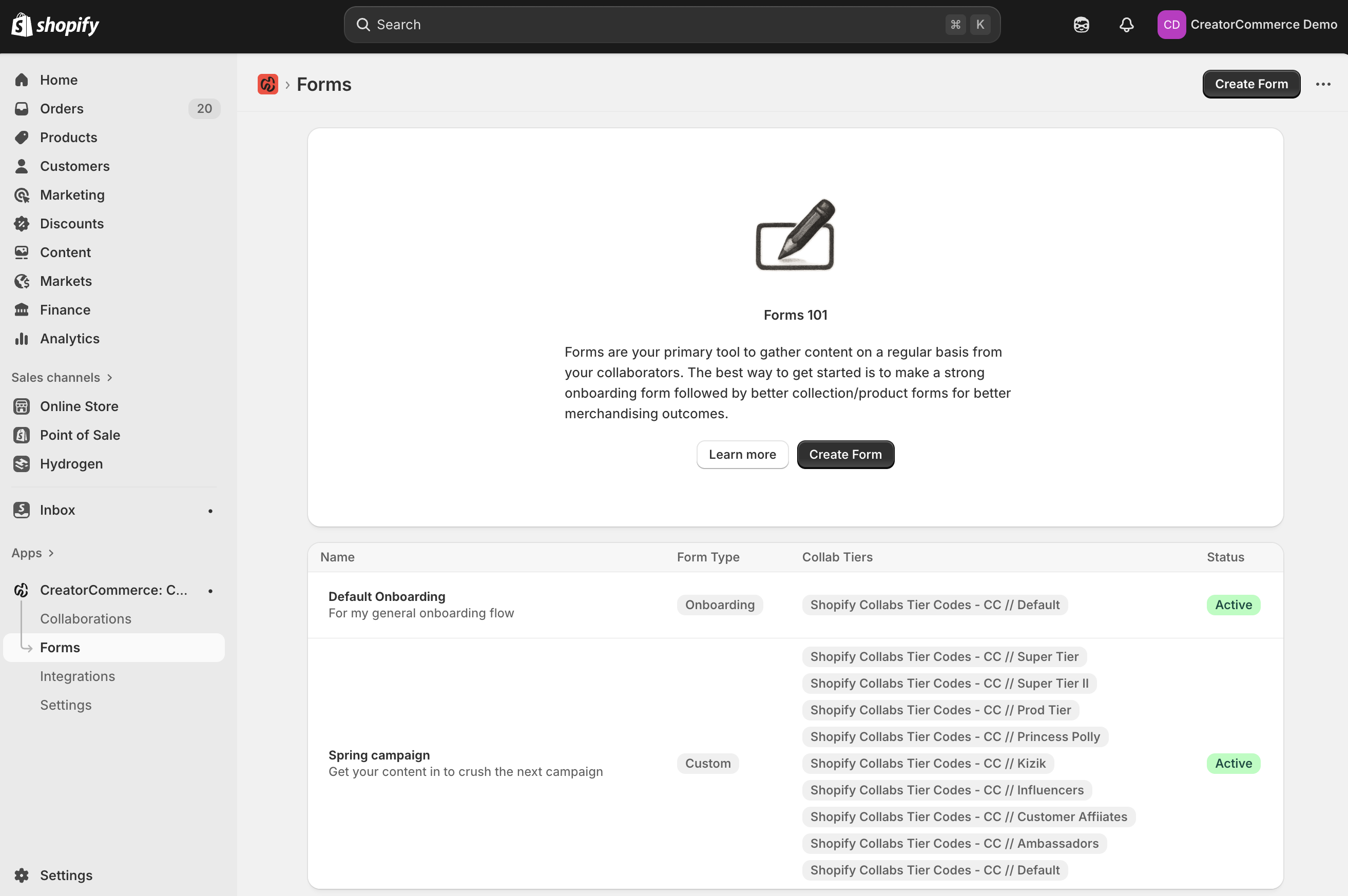
1. Onboarding Forms
The instant welcome moment. Automatically fire off an activation form when someone's approved. Gather what they need for their first personalized storefront, quickly, clearly, and with zero manual follow-up.
2. Collection Forms
Perfect for high-SKU or high-curation brands. Let creators build collections over time, request new product mixes, or update their storefront narrative on the fly.
3. Product Forms
Ideal for CPG and vertical brands with fewer SKUs but deeper storytelling needs. Capture product-level content, flavor notes, UGC ideas, comparisons, and more.
4. Custom Forms
The wildcard. B2B affiliate intake, recipe submissions, photoshoot preferences, brand-bio questions, wholesale details: whatever data your program needs, you can collect it.

Build a form in seconds: No tech, no tickets
The new builder removes every friction point. You simply:
- Give the form a title and description
- Choose which tiers or segments should receive it
- (In the demo: Shop by Collabs tiers, but this matches your real setup exactly.)
- Pick the fields you want
- Every option comes from your Custom Field Builder, the same flexible system that lets you create any data type you need, from logos and banners to copy blocks and business details.
- Add labels and descriptions for creators
- Save it, toggle it on, and you're done
The system automatically emails eligible creators, drops the form into their CreatorCommerce editor, and routes their submissions back into your personalization engine.
What Creators See: A guided, zero-friction workflow
When a creator logs into their store editor, the forms you've assigned appear instantly: no digging, no guessing, no mystery. They get a clean, step-by-step experience:
- Upload their logo
- Add a banner
- Write their hero header
- Submit collection details
- Provide product-specific content
- Share brand or business info
And behind the scenes, that data flows straight into their personalized storefront, shaping a shopping experience that's differentiated, conversion-oriented, and actually worth sharing.
Creators love it because it gives them control.
Brands love it because it eliminates chaos.
A better way to run creator programs
This isn't a plugin slapped onto the side of your workflow. It's a foundational tool for:
- Scaling creator onboarding without manual ops
- Increasing conversion through deeper personalization
- Giving creators a real role in merchandising
- Building differentiated collab experiences at speed
- Keeping your entire program structured and repeatable
In short: if you're serious about running meaningful collaborations, not just recruiting creators, this is the simplest, smartest way to capture the data that fuels them.
Forms 101: Now live in the CreatorCommerce dashboard
Four form types. Drag-and-drop building. Automatic creator delivery. Full customization. Built-in segmentation. Clean guided workflows. And zero engineering required.
The whole thing is designed to be picked up in seconds and capable enough to scale a full-funnel creator strategy.
This is how collaborations should work: simple for brands, intuitive for creators, and built to drive real outcomes.
More tools are coming, but this one changes the game immediately. Let's build.
Related Articles
- Introducing custom fields: personalization without limits
- 100 creative co-branded storefront use-cases (By category)
- A new era for CreatorCommerce: Self-serve, custom forms, and a Shopify-native dashboard built for scale
- Introducing funnel analytics: Finally, full visibility into your co-branded funnels
Frequently asked questions
What are CreatorCommerce custom forms used for?
Custom forms collect structured data from creators at different phases: onboarding (preferences, brand fit), collection curation (product picks, story), product-level (UGC, flavor notes, comparisons), and ad-hoc (B2B intake, recipes). Instead of spreadsheets and manual follow-ups, forms auto-populate storefront data. CreatorCommerce's Embedded Dashboard lets you build forms visually without code. Forms reduce ops burden by 70% and accelerate creator go-live by 2-3 weeks.
How do you build a custom form in CreatorCommerce?
In the CreatorCommerce dashboard, click 'Forms' and select a type (onboarding, collection, product, or custom). Add fields (text, dropdowns, file uploads, multi-select). Set workflow triggers (who gets the form, when, what data auto-populates the storefront). Save and share. No code required. Creators fill the form, and the data flows directly into their storefront. Setup takes 10-15 minutes per form type.
Can you use custom forms to collect UGC from creators?
Yes. Product forms let you request photo uploads, video descriptions, testimonials, and comparison content. Creators attach files directly. You see all submissions in one place, download them, and repurpose for marketing. This is why brands use custom forms: they're ops tools (data collection) and content tools (UGC generation) combined. CreatorCommerce data shows forms increase creator-submitted UGC by 60% vs. email-based requests.
Do creators see the forms or do admins fill them?
Creators can do both. You can make a form optional (creator self-serves) or required (they complete it to go live). For best results, combine: required onboarding form (ensures fit) and optional deep-curation forms (give creators control). CreatorCommerce lets you set visibility per form. High-friction forms (complex onboarding) should be required; low-friction forms (product-level UGC) should be optional to maximize completion.


%201.png)
%201.png)
