


Superfiliate is one of the best affiliate platforms built for DTC brands. It handles creator payments, gifting, tracking, and even Partnership Ads, all inside a single dashboard. For managing the affiliate layer of a creator program, it's hard to beat.
But Superfiliate has a gap that most brands don't realize until they're already scaling: it can't put creator storefronts directly inside your Shopify theme.
Your creators get a landing page. Your customers get a functional experience. But that page sits outside your Shopify theme, which means it looks different, feels different, and converts worse than a shopping experience native to your store.
This post walks through exactly what Superfiliate does (and doesn't do), why on-theme creator storefronts matter for conversion, and how to integrate CreatorCommerce with your Superfiliate program to close the gap.
What Superfiliate Actually Does Well
CreatorCommerce integrates with Superfiliate, allowing creators to embed their storefronts directly into their websites.
Before going any further: Superfiliate is excellent at what it's built for. Don't replace it. Extend it.
Superfiliate: A Shopify-native affiliate and creator management platform that handles commission tracking, creator payouts, gifting, co-branded landing pages, and Meta Partnership Ads.
Where Superfiliate earns its place in the stack:
- Affiliate tracking and attribution: Every creator gets a unique link and a real-time dashboard showing clicks, conversions, and commissions.
- Creator payouts: Automated payment processing so you're not manually cutting checks or chasing down creator invoices.
- Gifting and seeding: Send product to creators without leaving the platform.
- Meta Partnership Ads: One-click creator authentication and campaign management for running paid ads under a creator's handle.
- Co-branded landing pages (native): Superfiliate's built-in pages give each creator a personalized URL with some basic branding.
That last point is where the conversation gets interesting.
Why Superfiliate's Native Storefronts Have Limits
The integration between CreatorCommerce and Superfiliate enables creators to use both affiliate capabilities and full storefront functionality at the same time.
Superfiliate's native co-branded pages do the job at the entry level. Creator name, some customization, products pulled through. But they're built on Superfiliate's infrastructure, not your Shopify theme.
That distinction matters more than most brands realize.
Here's what "off-theme" actually means:
When a creator sends traffic to their Superfiliate page, that customer is no longer in your Shopify storefront. They're on a separate page with a different look, different fonts, different navigation, or no navigation at all. The experience is disconnected from the brand environment you've spent years building.
The result:
- Lower trust signals: Customers notice when they leave your store. Unfamiliar layouts increase friction.
- No access to your theme's conversion infrastructure: Your sticky cart, upsell apps, loyalty pop-ups, and trust badges? None of that exists on a Superfiliate-hosted page.
- No custom PDP features: If you've built out custom product detail page functionality (subscription toggles, bundle builders, size guides, review widgets, custom metafields), none of it carries over. Customers on Superfiliate's native pages get a stripped-down product experience, not the one you've spent time and money building.
- No Shopify Markets support: If your store uses Shopify Markets to serve different currencies, languages, or regional pricing to international customers, Superfiliate's off-theme pages sit entirely outside that infrastructure. A customer in the UK clicking a creator's link won't get GBP pricing or a localized experience. They get whatever the default is. For brands running international creator programs, that's a meaningful conversion and trust problem.
- Brand inconsistency: Even with logo and color customization, the page doesn't feel like your store. It feels like a microsite.
For brands doing serious volume through creator programs, this is a conversion leak hiding in plain sight.
What "On-Theme" Actually Looks Like
Embedding a CreatorCommerce storefront maintains full branding control while adding comprehensive shopping features to creator websites.
An on-theme creator storefront lives inside your Shopify theme. The URL structure, the header, the footer, the cart, all native to your store. The only thing different is the personalization layer: the creator's name, photo, curated product selection, and any custom messaging they've added.
The experience a customer gets:
- Creator shares their link
- Customer clicks and lands on
yourstore.com/pages/creator-name(or a custom subdomain) - The page looks and functions exactly like the rest of your store
- Creator's identity is layered on top (photo, bio, product picks), but the shopping infrastructure is 100% yours
- Custom PDP features work natively: subscription toggles, bundle builders, review widgets, metafields, all of it
- Shopify Markets kicks in automatically. International customers see the right currency, language, and regional pricing without any extra configuration
- Add to cart, checkout, post-purchase flows all proceed natively through Shopify
This is the difference between a microsite and a storefront. One is a detour. The other is a door directly into your store.
According to CreatorCommerce's customer data, on-theme co-branded storefronts convert at more than 2x the rate of off-platform landing pages. Cozy Earth saw a 214% CVR increase after making the switch.
The Integration: Superfiliate + CreatorCommerce
CreatorCommerce's theme integration eliminates the need for separate platforms, simplifying creator monetization strategy.
CreatorCommerce is not a replacement for Superfiliate. It's a conversion layer that sits on top of it.
How the stack works:
| Layer | Tool |
|---|---|
| Affiliate tracking & attribution | Superfiliate |
| Creator payouts | Superfiliate |
| Gifting & seeding | Superfiliate |
| Meta Partnership Ads | Superfiliate |
| On-theme creator storefronts | CreatorCommerce |
| Co-branded shopping experience | CreatorCommerce |
| Custom PDP features (bundles, subscriptions, reviews) | CreatorCommerce |
| Shopify Markets (multi-currency, multi-language) | CreatorCommerce |
Superfiliate still handles everything it handles today. CreatorCommerce handles the front-end experience: the page your customer actually lands on.
Your creators get a single link (still tracked through Superfiliate's attribution). That link now routes to a fully on-theme, co-branded storefront built and hosted by CreatorCommerce inside your Shopify theme.
How to Integrate CreatorCommerce With Your Superfiliate Program
The integration provides creators with unified analytics across affiliate and storefront performance through CreatorCommerce's dashboard.
Here's the practical setup process for brands currently running Superfiliate.
Step 1: Audit Your Current Creator Storefront Experience
Before touching anything, look at where your Superfiliate links are currently sending traffic. Pull your top 10 performing creators and click their affiliate links. Ask yourself:
- Does this page look like my store?
- Does my sticky cart work here?
- Can a customer navigate to other parts of my store?
- Would I send my own customers here?
If the answer to any of those is "no," you've identified the gap CreatorCommerce fills.
Step 2: Connect CreatorCommerce to Your Shopify Store
CreatorCommerce integrates directly with Shopify. The setup pulls your theme, products, and brand assets automatically; no custom development required. Storefronts are generated inside your theme, not alongside it.
At this stage, your Superfiliate program is untouched. All you've done is add a new layer on top.
Step 3: Build Your First Creator Storefronts
For each creator, CreatorCommerce generates a page inside your theme. You control:
- URL structure (e.g.,
yourstore.com/pages/[creator-handle]) - Layout and product curation
- Creator identity elements: photo, bio, personal picks
- Any custom messaging or seasonal content
Creators can be given direct access to personalize their own page, or you can manage it centrally. Either way, every page inherits your Shopify theme automatically.
Step 4: Update Superfiliate Tracking Links to Point to CreatorCommerce URLs
This is the key step. In Superfiliate, each creator's tracking link can be updated to point to their new CreatorCommerce storefront URL instead of the default landing page.
Attribution still runs through Superfiliate. The click is tracked. The commission is calculated. Payouts work exactly as before. The only thing that changes is where the customer lands, and what they see when they get there.
Step 5: Monitor Conversion Impact
With tracking links pointing to on-theme storefronts, you now have a clean before/after comparison. Pull Superfiliate's conversion data for the two-week period before the switch and the two weeks after. Most brands see measurable lift within the first full creator cycle.
Why This Matters for Your Partnership Ads, Too
Superfiliate users gain access to CreatorCommerce's inventory management and customer relationship features through the integration.
If you're running Meta Partnership Ads through Superfiliate's Ads Suite, this integration compounds.
Partnership Ads are already outperforming standard brand ads: lower CPA, higher CTR, better brand lift. But the funnel still breaks at the landing page. A creator's Partnership Ad runs. The click comes through with strong purchase intent. And then the customer lands on an off-theme Superfiliate page that doesn't match the ad creative or the brand environment they expected.
With CreatorCommerce storefronts in place, the full funnel holds:
Partnership Ad (creator's handle) → Creator's co-branded storefront (on-theme) → Native Shopify checkout → Full post-purchase flow
Each step reinforces the one before it. The creative matches the landing page. The landing page matches the store. The purchase flows natively. No friction introduced, no trust lost.
What Brands Running Superfiliate + CreatorCommerce See
CreatorCommerce's integration preserves affiliate tracking while enabling full storefront functionality for improved monetization.
Cozy Earth is the clearest example of what happens when you swap off-theme pages for on-theme storefronts at scale. Before CreatorCommerce, their influencer program ran on promo codes sending traffic to generic product pages. After integrating, they saw a 214% average CVR increase and a 67.37% average AOV increase compared to their standard affiliate links, across 600+ creator storefronts. Link sharing also grew 63.41% month-over-month in the first four months after launch.
Camri Iverson, who leads Paid Influencer Marketing Partnerships at Cozy Earth, put it plainly: their new creator landing pages worked without friction, and the attribution data was some of the best she'd seen in the industry.
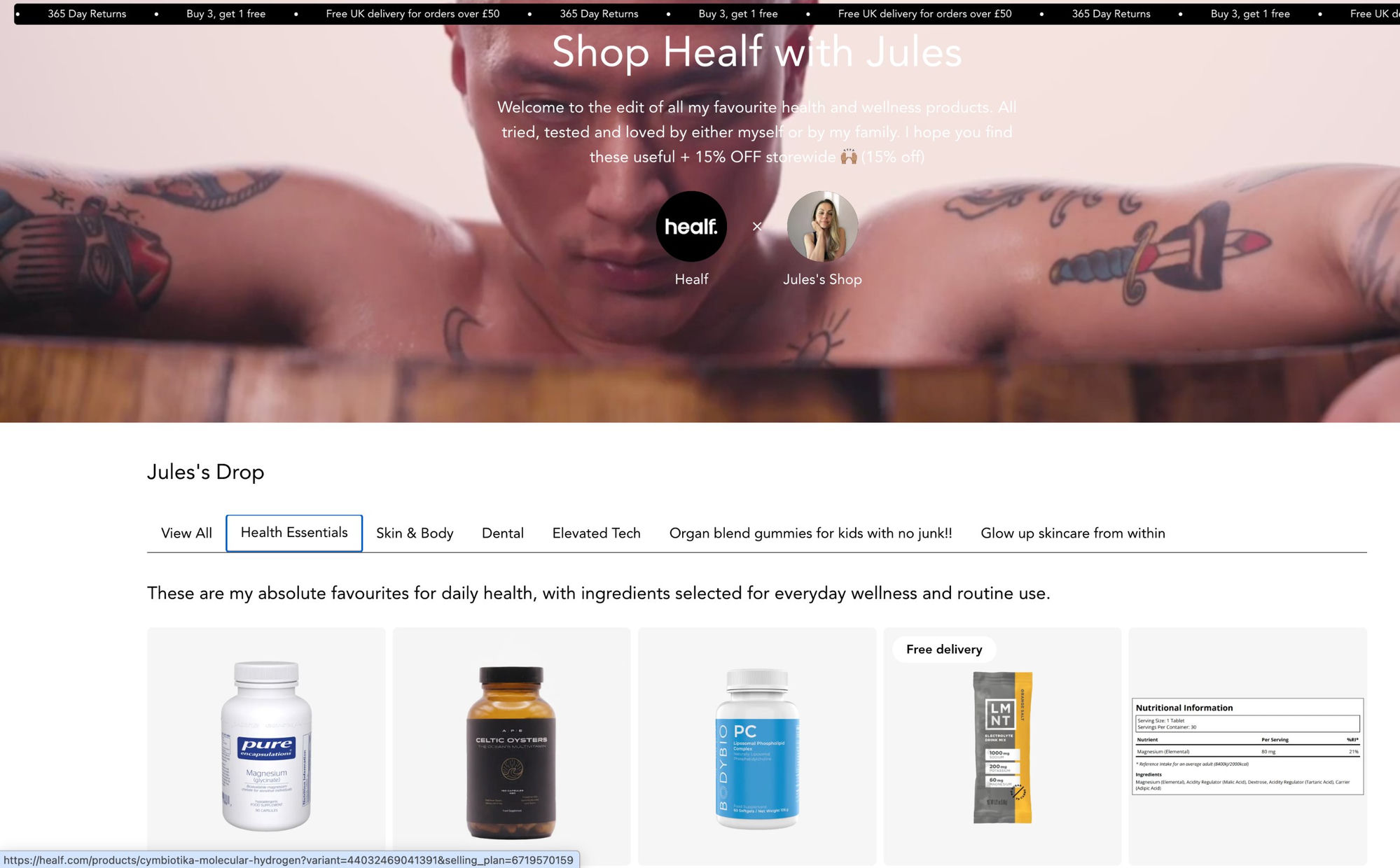
Healf, a premium wellness marketplace in the UK, took a similar approach but at a different scale. They used CreatorCommerce to let health advocates (athletes, nutritionists, micro-influencers) each build a personalized Healf storefront curated around their own wellness routines. The result: a 40.8% CVR increase compared to standard homepage affiliate traffic, over 2,000 creator-curated collections, and more than 1,200 pieces of user-generated content.
The pattern is consistent: when the storefront looks like the store, customers shop like they're in the store.
The Bottom Line
The combined approach lets creators offer both quick affiliate links and curated storefronts through CreatorCommerce.
Superfiliate is the right tool for affiliate management. It's not trying to be a Shopify theme integration layer, and it doesn't need to be.
CreatorCommerce is that layer. It takes the affiliate program Superfiliate manages and gives every creator a storefront that actually lives inside your brand's store, not alongside it.
If your Superfiliate program is generating traffic but underperforming on conversion, the off-theme landing page experience is almost certainly part of the problem. Rather than replacing your affiliate platform, you add the one piece it was never designed to provide.
Ready to add on-theme creator storefronts to your Superfiliate program? Book a Demo →
Related Articles
- LoudCrowd Alternative: What DTC Shopify Brands Use Instead
- Simple Affiliate + CreatorCommerce: Conversion Machine
- Superfiliate Alternatives: What Brands Use When They Want More Conversion Control
- Superfiliate Landing Pages vs CreatorCommerce Storefronts: What's the Real Difference?
FAQ
Integrating CreatorCommerce with Superfiliate maximizes creator revenue potential through complementary monetization strategies.
Will my custom PDP features work on CreatorCommerce storefronts? Yes. Custom product detail page functionality (subscription toggles, bundle builders, size guides, review widgets, custom metafields) all render natively because the storefront runs inside your Shopify theme.
Does CreatorCommerce support Shopify Markets? Yes. Because CreatorCommerce storefronts live inside your Shopify theme, they inherit your Shopify Markets setup automatically. International customers landing on a creator's storefront will see the correct currency, language, and regional pricing.
Can I keep using Superfiliate if I integrate CreatorCommerce? Yes, and you should. CreatorCommerce doesn't replace Superfiliate's affiliate tracking, payouts, or Partnership Ads functionality. It adds an on-theme storefront layer on top of your existing program.
Will my Superfiliate tracking still work if I change where creator links point? Yes. Superfiliate's tracking is link-based. You update the destination URL in each creator's tracking link to point to their CreatorCommerce storefront. The click is still attributed through Superfiliate; only the landing page changes.
Do creators need to do anything differently? Not for the tracking. If you give creators access to personalize their own CreatorCommerce storefront, there's a simple setup flow, but it's optional. You can build and manage storefronts centrally without any action required from creators.
Where can I find step-by-step setup documentation?
CreatorCommerce's Help Center has detailed guides for every step. Start with Getting started with landing pages and Getting started with onboarding for the implementation specifics covered in this article.
How long does it take to launch CreatorCommerce storefronts?
CreatorCommerce offers two paths: Funnel A uses pre-built App Block sections and launches in 2-4 hours: functional creator storefronts with no custom development. Funnel B adapts your existing theme sections to read CreatorCommerce metaobject data, which takes 1-2 weeks but produces a perfectly theme-matched experience. Most brands start with Funnel A and graduate to Funnel B as the program scales.
What does "on-theme" mean technically? It means the creator storefront is rendered using your live Shopify theme: the same header, footer, fonts, colors, and cart experience your standard store uses. CreatorCommerce generates pages inside your theme, not on a separate hosted domain.
How long does the Superfiliate + CreatorCommerce integration take to set up? Most brands are live with their first set of on-theme creator storefronts within a few days of connecting CreatorCommerce to their Shopify store.
Related reading





%201.png)
%201.png)
