


Simple Affiliate gives you affiliate tracking and automated payments. But it doesn't give your creators a branded storefront, a dedicated shopping page where they can feature curated products and build a real co-brand relationship with your audience. That's the core gap most SA users face when they scale beyond 20 or 30 affiliates.
In this guide, we'll show you exactly how to add co-branded storefronts to your Simple Affiliate program using CreatorCommerce. The whole setup takes about 15 minutes and drives significant uplift: CreatorCommerce is a Shopify-native platform that helps DTC brands build co-branded creator storefronts, personalized shopping pages that live on the brand's own domain. When your affiliates promote their own branded page instead of a generic link, conversion rates and AOV climb dramatically.
Why Simple Affiliate Creators Need Storefronts
Here's the problem: Simple Affiliate gives each affiliate a unique referral link. They copy it, paste it in their bio, and send their audience there. The audience clicks through to your product page rather than their page. There's no sense of curation, no "this creator hand-picked this for you," no premium experience.
Compare that to what happens with a co-branded storefront:
- Curation: The creator picks the 5-8 products they genuinely use and love. Your audience sees their taste, not your entire catalog.
- Story: The page has the creator's photo, bio, and their personal reason for recommending your brand, instead of a generic landing page.
- Trust: Visitors feel like they're shopping with the creator, not just following a random affiliate link.
- Ownership: The creator feels like a co-brand partner. They're more likely to promote hard and repeatedly.
The data backs this up. Brands that move from affiliate links to co-branded storefronts see average CVR increases of 30-214% and AOV increases of 67-78%. And affiliates with storefronts send more traffic and convert it better because they're emotionally invested in the outcome.
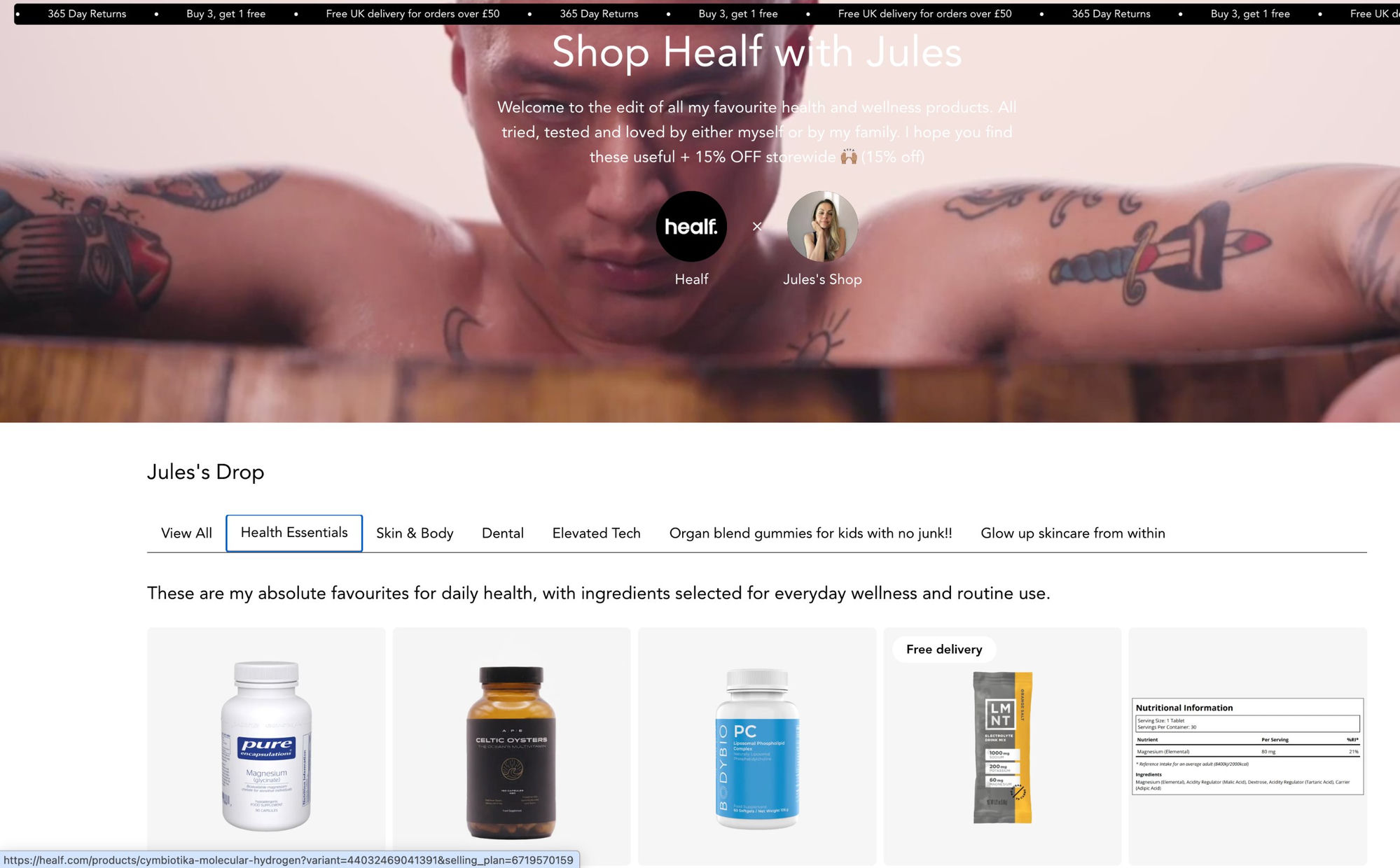
What Is a Co-Branded Storefront?
Definition: A co-branded storefront is a dedicated shopping page that lives on your domain, customized with a creator's name, photo, and curated product collection. It merges your brand identity with the creator's personal brand, creating a hybrid experience that feels like a collaboration, not just an affiliate link.
Example: A creator named Sophia who loves your skincare line gets a storefront at yourdomain.com/sophia. The page shows her photo, a short bio, and her pick of 6 products from your catalog: moisturizer, serum, cleanser, etc. Visitors shopping there know it's Sophia's curated selection, and all purchases are tracked to her affiliate group in Simple Affiliate.
The storefronts are templated (so you don't custom-design each one), but each creator's is unique by default: their name, their bio, their product picks.
How the Simple Affiliate + CreatorCommerce Integration Works
Before we dive into the setup, here's the architecture:
- Simple Affiliate groups (e.g., "Tier 1 Creators," "Nano-Influencers") map 1:1 to CreatorCommerce storefronts.
- Each storefront is a custom Shopify landing page with the creator's branding and product curation.
- When a customer buys from a storefront, the purchase is attributed to that creator's affiliate group in SA, and SA handles the commission payout automatically.
- The redirect URL in SA's group settings points to the CreatorCommerce storefront instead of a generic product page.
The integration uses Shopify Flow, a native Shopify automation tool, to keep data synced between your affiliate groups and the storefronts. New affiliates added to a group automatically sync to CreatorCommerce.
The 5-Step Setup
Step 1: Download the Shopify Flow File
CreatorCommerce provides a pre-built Shopify Flow that automates the sync between your Simple Affiliate groups and CC storefronts. This flow runs every few hours and ensures new affiliates in your SA groups are immediately available in CreatorCommerce.
What to do: Visit the integration setup guide and download the Shopify Flow JSON file. Save it to your desktop; you'll import it in the next step.
Step 2: Import the Flow into Shopify
Open your Shopify Admin, navigate to Automation > Flows, and click Create Flow. Select Import Flow and paste the JSON file you downloaded. Shopify will auto-configure the flow.
Once imported, the flow sits idle until you enable it (we'll do that in Step 4). Don't worry if you see placeholder fields; those are filled in the next steps.
Step 3: Generate Your CreatorCommerce API Token
Log into your CreatorCommerce dashboard and navigate to Settings > API & Integrations. Generate a new API token. CreatorCommerce calls this your "Integration Token." Copy it to your clipboard.
This token lets the Shopify Flow communicate with CreatorCommerce to sync your affiliate groups and update storefronts in real-time.
Step 4: Configure the Flow with Your API Token
Return to Shopify, open the imported flow, and find the step that says "Send to CreatorCommerce API." Paste your API token into the authentication field.
Then, enable the flow by toggling Flow Active > On. The flow now runs automatically whenever you add or modify affiliates in your Simple Affiliate groups.
Step 5: Set the Redirect URL in Simple Affiliate
This is the critical piece. In your Simple Affiliate account, go to your affiliate group settings (e.g., "Tier 1 Creators"). Under Referral Link Configuration, you'll see a field for the Redirect URL.
Instead of SA's default (which sends traffic to a generic product page), enter your CreatorCommerce storefront domain. For a creator named Maya, that looks like: https://yourdomain.com/maya
When Maya shares her affiliate link, her audience lands on her co-branded storefront instead of a generic page. All purchases attribute to her group in SA, and SA handles payouts automatically.
Repeat this for each affiliate group you want to connect to storefronts.
What Happens After Setup
Auto-Sync
The Shopify Flow checks your Simple Affiliate groups every 4 hours. When you add a new affiliate to a group, the flow automatically syncs them to CreatorCommerce. Within 4 hours, they appear in your CC dashboard, and you (or they) can customize their storefront: photo, bio, product picks.
You don't manually update CreatorCommerce every time you recruit an affiliate. The integration handles it.
The Redirect Flow
When an affiliate shares their storefront link (e.g., yourdomain.com/maya), here's what happens:
- A customer clicks the link.
- The browser lands on Maya's co-branded storefront, which shows her curated products and story.
- The customer adds items to cart and checks out.
- The order is attributed to Maya's affiliate group in Simple Affiliate (SA's tracking code is embedded in the storefront).
- At the end of the month, SA calculates Maya's commission and pays her automatically via Stripe.
Simple Affiliate sees the same data it always does: order ID, amount, affiliate group, commission owed. The only difference is the landing page experience the customer sees.
Pro Tips for Maximizing Your SA + CreatorCommerce Setup
Tier Your Storefronts
Map your Simple Affiliate groups to tiered storefront experiences. Premium affiliates (your top 10%) get fully customized storefronts with priority support. Newer or smaller affiliates get the standard template. This incentivizes growth and makes your program feel hierarchical.
Curate Products for Each Creator
Don't let every affiliate show your entire catalog. Work with top creators to hand-select 5-8 products they genuinely use. This is the #1 driver of CVR uplift: curation and taste matter more than quantity.
Update Storefronts Seasonally
Keep creator storefronts fresh. If you launch a new product line or seasonal collection, update your top creators' storefronts to feature it. This reminds them the partnership is active and gives them fresh content to promote.
Use CreatorCommerce Analytics
CreatorCommerce tracks engagement metrics for each storefront: views, bounce rate, add-to-cart rate. Compare these to your Simple Affiliate commission data to identify which creators are most efficient at driving high-AOV orders. Double down on those creators.
Communicate the Setup to Affiliates
When you roll out storefronts, tell your affiliates why. Frame it as a premium upgrade: "We built you a branded storefront on our domain to help you stand out and drive higher conversions." Most creators will be excited; some will need a walkthrough. CreatorCommerce provides onboarding assets.
Troubleshooting
The Shopify Flow says "Error connecting to CreatorCommerce API"
Double-check your API token. It's case-sensitive and expires after 90 days. Generate a new token in CreatorCommerce Settings and re-paste it into the flow.
An affiliate was added to SA but isn't showing in CreatorCommerce
The flow runs every 4 hours. Wait 4-6 hours and check again. If they still don't appear, manually trigger the flow in Shopify to run immediately. If that fails, contact CreatorCommerce support; there may be a data formatting issue on the SA side.
Orders aren't attributing to affiliates
Verify that Simple Affiliate's tracking code is embedded on the CreatorCommerce storefronts. This is typically done during integration setup, but check your CC settings to confirm SA's pixel is active. Also confirm the redirect URL in SA is correct; typos in the domain will break attribution.
Related Articles
- 100 creative co-branded storefront use-cases (By category)
- Connect multiple affiliate platform tiers to a single CreatorCommerce campaign
- How to Build a Creator Affiliate Program for Beauty Brands
- Introducing CreatorCommerce's New Co-Branded Page Builder
- Introducing the Brand Switcher: switch brands with ease when using CreatorCommerce
- Sephora is just the beginning: Why every brand can win with creator storefronts
- Support for co-managed storefronts is here - fueling more brand/creator collaboration
- Turn brand loyalists into brand advocates with the new Tapcart integration
- Simple Affiliate Review: Features, Pricing, and What's Missing
- Simple Affiliate Landing Pages
- Discount Codes vs Creator Storefronts
- Scale Your Simple Affiliate Program Past 100 Creators
Frequently Asked Questions
Do I need to change anything in Simple Affiliate to use this integration?
Only one thing: the redirect URL in your affiliate group settings. Instead of SA's default, you point to your CreatorCommerce storefronts. SA's core functionality (tracking, payouts, groups) stays exactly the same.
Can I use storefronts with some affiliates but not others?
Absolutely. If you only want to give storefronts to your top-tier affiliates, create a separate group called "Storefront Creators," sync that group to CreatorCommerce, and leave your other groups with standard referral links. Simple Affiliate handles both simultaneously.
Who owns the storefronts, me or the creator?
You own the infrastructure (the domain, the pages, the tracking), but each creator controls their content: photo, bio, product picks. CreatorCommerce provides tools so creators can update their info directly. You set the boundaries (no competitor mentions, keep it brand-safe), but they own the personalization.
What if a creator leaves my program?
Remove them from the Simple Affiliate group. The Shopify Flow will sync that change, and their storefront becomes inactive (or you unpublish it manually in CreatorCommerce). Their old storefront URL goes dark, but you can repurpose the page for a new creator.
Does this integration work with Simple Affiliate's different pricing tiers?
Yes. You need at least the Basic plan ($19/month) to have affiliate groups, which are required for the integration. Free tier won't work because it doesn't support groups or affiliate group settings.
Can I customize the storefront design beyond the template?
CreatorCommerce provides template designs you can configure (colors, fonts, layout). For fully custom designs, you'd need custom CSS or a separate landing page builder. For most use cases, the templates are sufficient and ship faster.
Next Steps
You're ready to set up. Start with Step 1 and work through the setup; the whole process should take 10-15 minutes if you have Shopify Admin access and know your Simple Affiliate group structure.
For detailed, step-by-step screenshots and troubleshooting, visit CreatorCommerce's Simple Affiliate integration guide.
Once your storefronts are live, you'll start seeing the uplift: higher CVR, higher AOV, and best of all, more engaged affiliates who feel like co-brand partners instead of link distributors.
Questions? Reach out to CreatorCommerce or check out our getting started guide for more resources on managing creator partnerships at scale.





%201.png)
%201.png)
